
Claude Observatory (activity dashboard) · Day 27 · May 27, 2026 · 7 min read
Claude Observatory — Electron build, route fixes, and launch kit
A six-day batch on the local-only Claude activity dashboard: Electron packaging into a Windows EXE, a 404 fix that was hiding every new route, memory/skills/prompts filter pills, side-nav scroll fix, and a 24-screenshot multi-platform launch kit (dev.to, LinkedIn, X, YouTube Shorts, TikTok, Facebook, Instagram, Remotion script).
By Andy D — Founder, Creative Brain Inc. — Brampton, Ontario
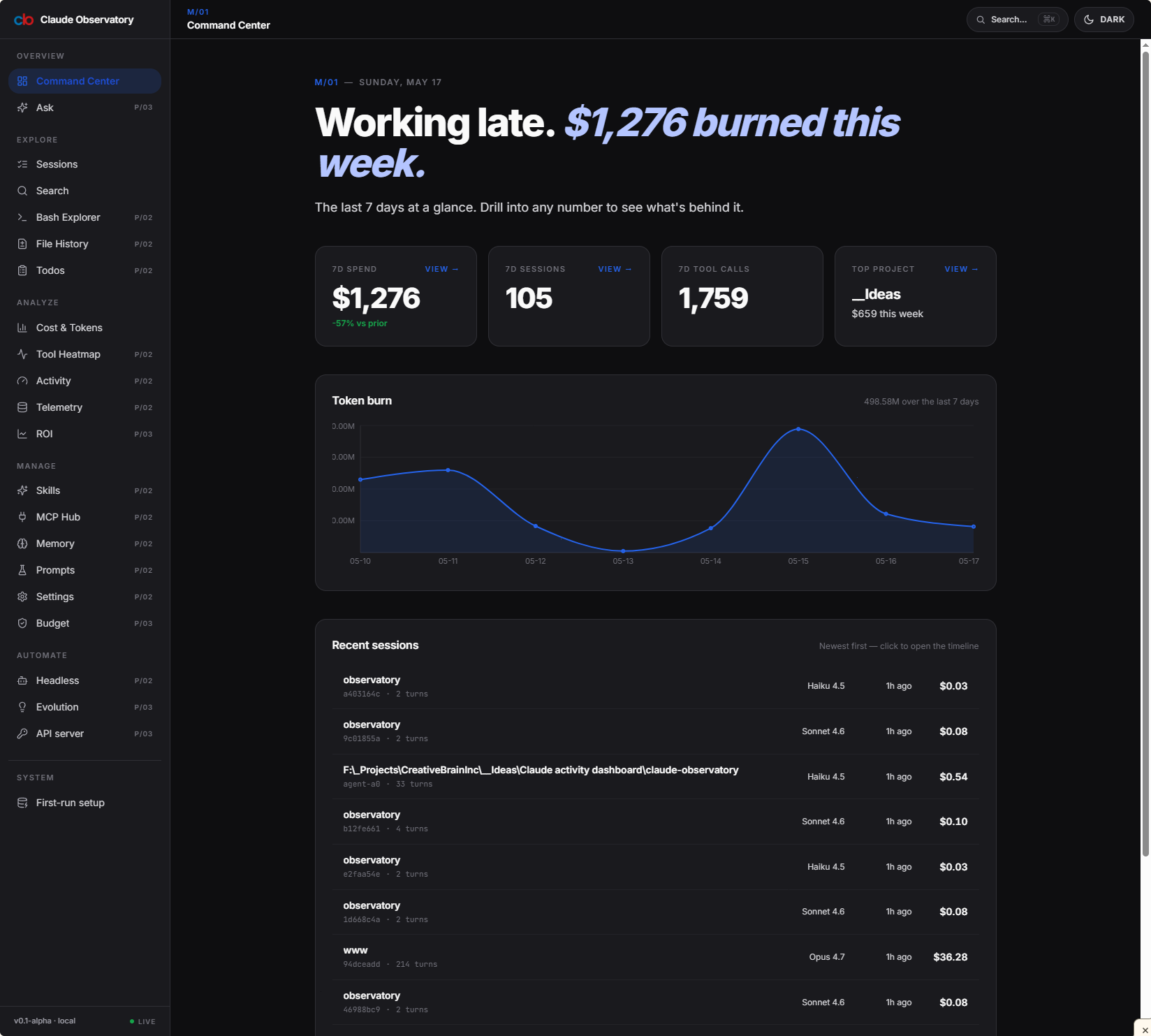
Claude Observatory dashboard after this batch landed. The left nav is the fixed-position version (no more scroll), and Memory / Skills / Prompts are the three routes that got real filter pills in the same sprint.
TL;DR
- Packaged Observatory as a Windows EXE via Electron — first version that runs without
npm run dev. - Fixed a 404 storm where new top-level dashboard routes silently failed to register. Symptom looked like missing pages; root cause was a route-manifest miss.
- Memory, Skills, Prompts pages got the same filter-pill UI pattern: counts, colored dots, line-clamp-2 titles, project eyebrow. Three routes, one consistent toolbar.
- Side nav stopped scrolling with the page — small fix, big quality-of-life win on long session views.
- Launch kit shipped: 24 route screenshots covering every page in the app, plus copy for dev.to, LinkedIn, X (thread), YouTube Shorts, TikTok, Facebook, Instagram, a Remotion video script, and a cover-art philosophy doc.
Observatory stays local-only — no data leaves the machine. The launch kit is for telling the story, not for moving the architecture.
Why we shipped this batch
Observatory is a local-first tool: it reads your Claude Code JSONL session files from ~/.claude/projects/ and renders them as a navigable dashboard. By mid-May the core data layer was solid, but the surface was rough — a few of the most useful sub-pages were 404ing on fresh installs, the nav didn't behave like a real app, and there was no way to run it without keeping a terminal open with npm run dev.
This batch closes that gap. The Electron wrapper turns it into something you can double-click. The route + nav fixes mean the experience matches the polish of the data underneath. And the launch kit — eight platforms' worth of copy plus a Remotion script — exists because the next step is telling people the project is real, with screenshots that show every route working.
Files added or modified
Electron packaging (new surface)
Claude activity dashboard/claude-observatory/— Electron config added (dist-electronexcluded from git via.gitignore).- Build target: Windows EXE via
electron-builder. Adds a packaged-build path alongside the existingnpm run devflow.
Route + nav fixes
src/app/(dashboard)/layout.tsx— side-nav repositioned so it stays in place when the main column scrolls.src/app/(dashboard)/memory/MemoryClient.tsx— filter pills, count badges, list-page polish.src/app/(dashboard)/memory/[encoded]/MemoryDetailClient.tsx— detail layout aligned with the broader list-page UI pattern.src/app/(dashboard)/skills/SkillsClient.tsx— same filter-pill / count-badge treatment as memory.src/app/(dashboard)/prompts/PromptsClient.tsx— same again, for the prompts route.src/lib/api/memory.ts— memory loader updates supporting the new filter UI.README.md— updated to reflect the new routes + Electron build instructions.
Headless + orchestrator fixes
src/lib/ask/orchestrator.ts— issue fixes around the ask flow.src/lib/headless/invoke.ts— invocation path stabilised.tests/unit/headless-invoke.test.ts— test updated alongside.
Launch kit (no app code)
assets/screenshots/claudeOS-*.png× 24 — every dashboard route captured, light + dark, ready for any platform.social-media/devto-article.md— long-form launch article for dev.to.social-media/devto-cover.png+social-media/devto-cover-philosophy.md— cover image and the design note explaining the choices.social-media/linkedin-post.md— LinkedIn launch copy.social-media/twitter-thread.md— X thread breakdown.social-media/youtube-shorts-script.md— 60-second YouTube Shorts script.social-media/tiktok-script.md— TikTok-format script (different beat structure than the YT one).social-media/facebook-post.md,social-media/instagram-post.md— platform-specific copy.social-media/remotion-video-script.md— Remotion script for a programmatic demo video.social-media/README.md— index of the launch assets.
Design rationale
Local-only stays local-only
Electron packaging was tempting to combine with a "phone home" telemetry channel — usage stats, opt-in error reports, the usual. We didn't. Observatory's pitch is that no data leaves your machine: it reads JSONL files Claude Code already writes locally, renders them, and that's it. Adding telemetry would have changed the trust story. The packaged EXE has zero outbound network calls beyond what the user opts into.
One filter UI pattern, three routes
Memory, Skills, and Prompts are different domains (memory entries vs. skill definitions vs. saved prompts), but the user task is the same: scan a list, narrow by attribute, drill into one item. So all three routes use the same toolbar pattern — filter pills with counts and colored dots, line-clamp-2 titles, project name as eyebrow. New routes that match this shape should reuse the same pattern instead of inventing a fourth.
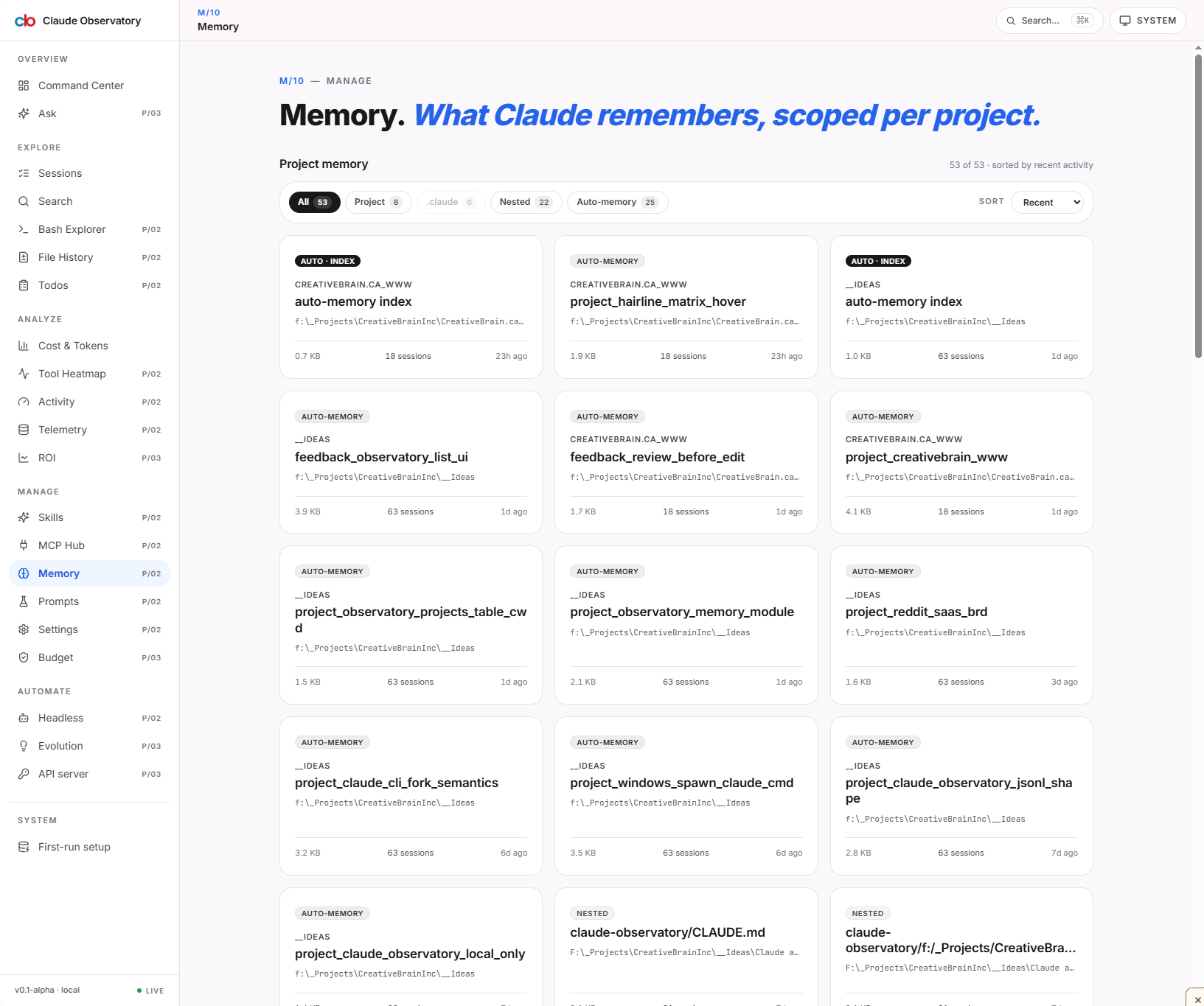
Memory route — first of three using the shared toolbar pattern. Filter pills run across the top with per-pill counts; each entry shows a colored project dot, a two-line title, and a project eyebrow.
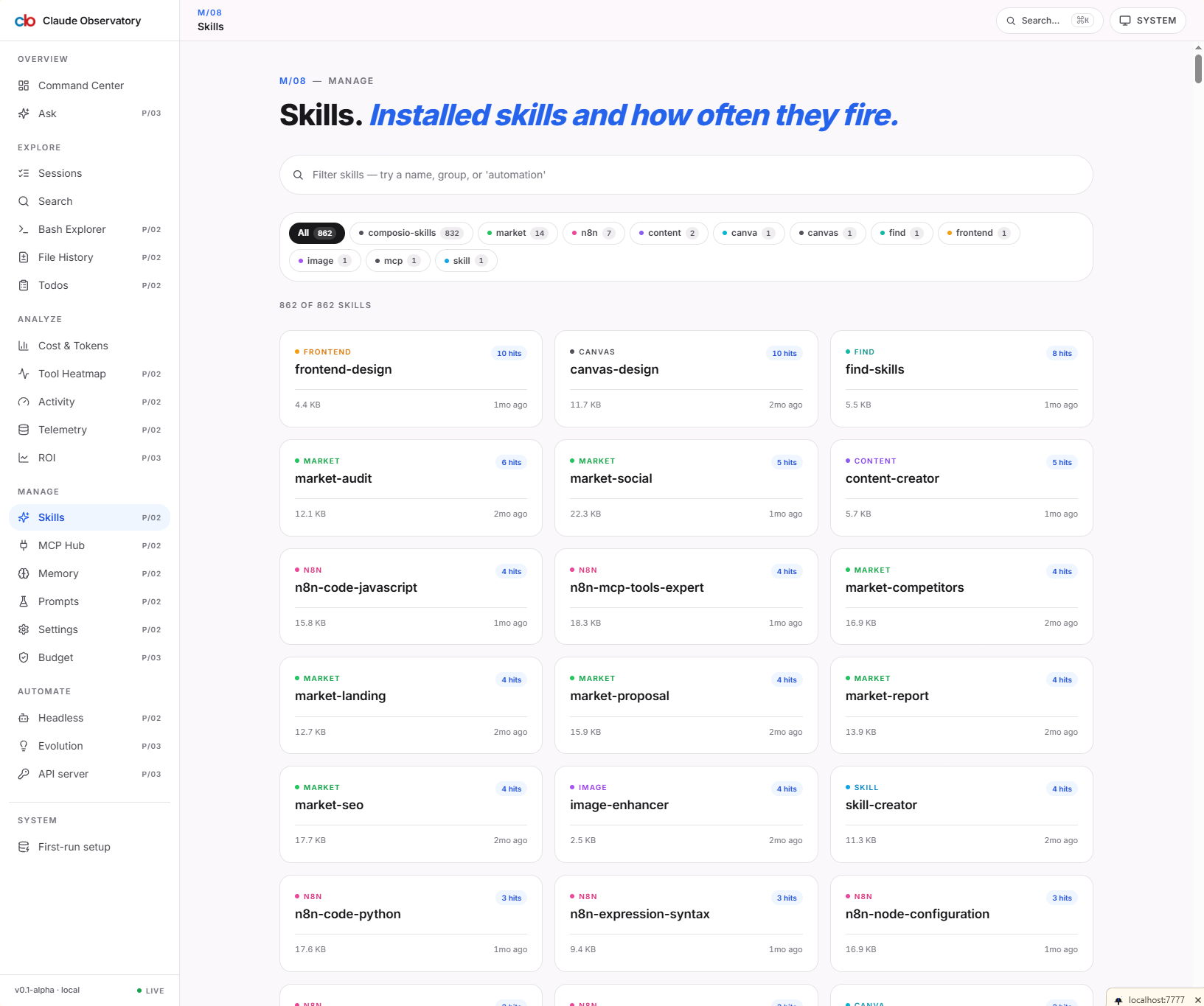
Skills route — same toolbar pattern, different data domain. The point of the consistency is that scanning behaviour transfers between routes; no relearning.
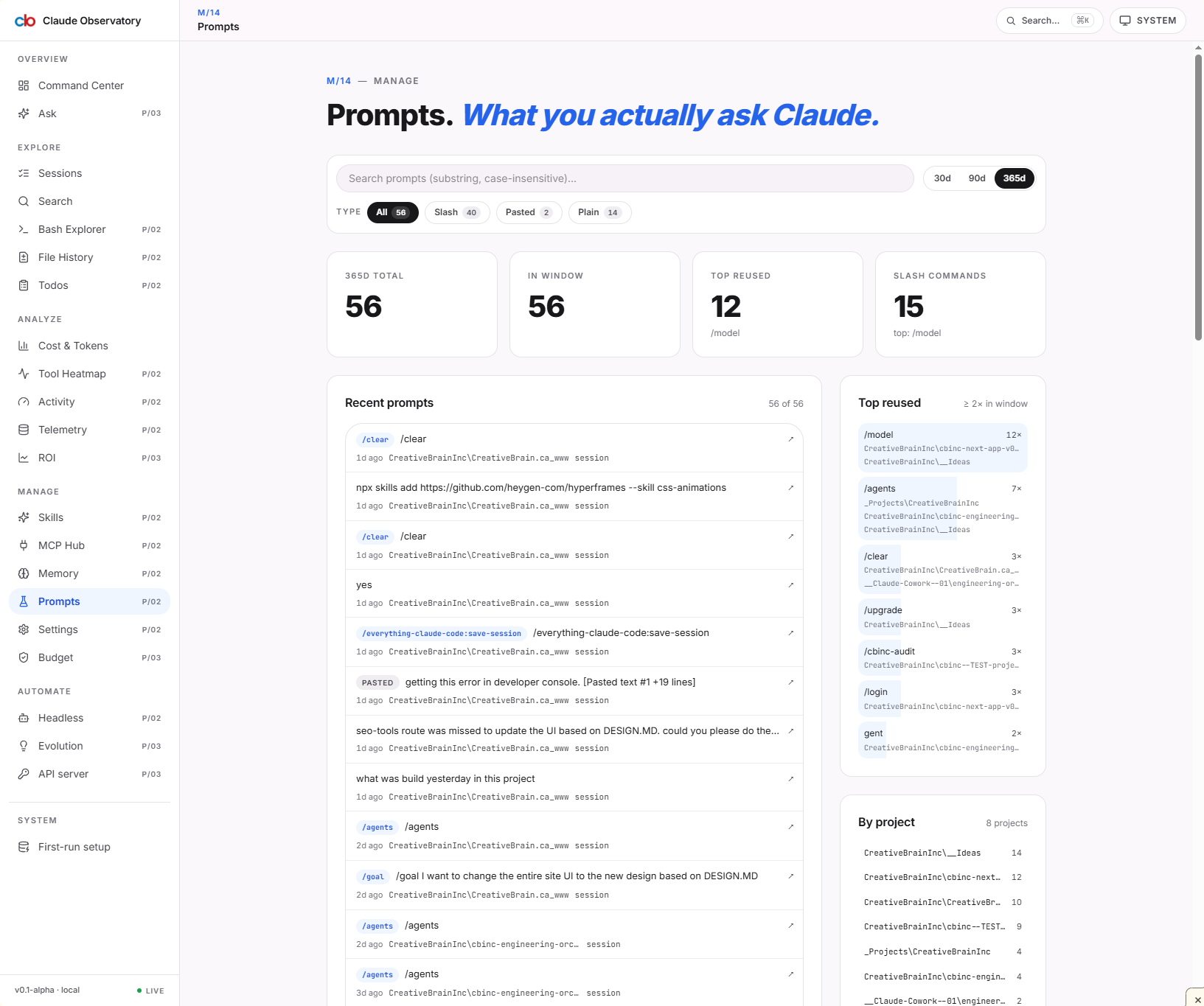
Prompts route — third application of the same pattern. Any future route that matches the "scan a list, narrow by attribute, drill in" shape should reuse this toolbar instead of inventing a fourth variant.
Route 404 fix — manifest, not pages
The symptom was "new routes return 404 even though the file exists." Initial guess was a missing page.tsx export or a bad slug. Real cause: Next's dev-time route manifest didn't pick up the new top-level folders during HMR. A dev-server restart resolved it; a stale Turbopack cache was the underlying issue. Same gotcha bit the cbinc-www site a week later (see Batch D's "OG image + edge runtime" note) — different root cause, same outward shape.
Why the launch kit is eight platforms
Each platform pays back differently. Dev.to gets indexed and ranks; LinkedIn is where the buyers are; X thread is for the dev-tools audience; YouTube Shorts + TikTok are for the algorithmic reach; FB/IG keep the brand surface consistent; the Remotion script is so we can regenerate the demo whenever the UI changes. The cost was a single afternoon — much cheaper than launching three times because the first attempt missed an audience.
Gotchas we hit
-
Turbopack caches new top-level routes lazily. If a route 404s after you add it, restart
npm run devbefore debugging the file. We lost an hour to this. Same lesson appears in the cbinc-www Batch D log — worth carrying forward to every Next.js project on the machine. -
dist-electronbelongs in.gitignorefrom day one. Electron's build output is large and platform-specific. Forgetting this once is enough to bloat a commit by hundreds of MB. -
Path-with-spaces matters on Windows. "Claude activity dashboard" has a space in it. A few build scripts and ripgrep invocations need quoted paths. Worth noting in the README for anyone cloning fresh.
-
Memory route → on-disk folder mapping is via the projects table. Don't scrape JSONL to figure out which project a memory entry belongs to — the
projectstable already has theid→ on-disk-folder mapping. We rewrote this once already; don't do it a third time.
Verifying the work
# Dev-mode sanity check
cd "Claude activity dashboard/claude-observatory"
npm install
npm run dev
# expect: http://localhost:3000 lands on dashboard, no 404 on /memory, /skills, /prompts
# Packaged build (Windows)
npm run electron:build
# expect: dist-electron/<...>.exe runs without a terminal,
# reads ~/.claude/projects/, no network calls
Visual smoke test:
- Open
/memory— filter pills render with counts, colored dots, line-clamp-2 titles. - Open
/skills— same toolbar pattern, different data. - Open
/prompts— same toolbar pattern, different data again. - Scroll a long session — left nav stays put.
What's next
- macOS + Linux Electron builds. Windows EXE shipped; macOS
.dmgand Linux.AppImageare next, then a real signed-release flow on GitHub Releases. - Auto-update channel. Once there's a real release stream, wire
electron-updaterso packaged installs don't go stale. - Publish the launch posts. All eight platforms' copy is ready; the actual posting cadence is the next decision. Probably dev.to first (indexable, long-tail), then LinkedIn + X within 24 hours, then video platforms once the Remotion script is rendered.
- A "what changed since you last opened it" view. Right now Observatory shows everything; the next high-leverage feature is a diff view scoped to "since last visit" so returning users land on what's new.